Video Essays from the Course
Essay on a Year in Computing History
The first assignment is an exercise in the art of description. Its goal is to prepare you for the final project and give you some experience with the archive of materials that you’ll use for that project.
Select a Year and a Magazine Issue
Each student will sign up for a different year between 1975 and 1995 and within that year select one issue of a computer magazine available on Archive.org to focus on. You are encouraged to work in languages other than English if you’d like, as long as the final paper translates all necessary information for an Anglophone reader.
Choose one article or advertisement from the magazine issue and use it as a way to capture that moment in computing history. The idea is to use specific details related to one object to explain its situatedness alongside other events happening at the same time and represented by the same magazine issue.
Be sure to provide necessary title, byline, issue, and magazine information. No outside research is necessary, but it might be useful to look at other issues of the same magazine to understand its topic, angle, tone, voice, audience, etc.
Analyze and Describe
High priority in grading the paper will be placed on the details and quality of description. To put it bluntly, the assignment is designed to do something that generative AI is not yet able to do, that is, to analyze multimedia texts composed of images, text, and other symbols and to explain how their composition represents the beliefs and mood of a particular moment in computing history.
Some questions to consider include:
- What medium of expression, whether text or image or both, is used to represent the computer and/or computer software in your article or advertisement? What kind of language is used? Is it formal or colloquial? Does it seem to target a technical audience or a popular audience? How would you describe the layout and design of the article or advertisement? What tone does it strike, and what feelings does it evoke?
- In terms of images, what are the visual characteristics you can identify? Is the imagery clean and spare? Or is it busy and complicated? What colors are used, and what tone do they strike, or what feelings do they evoke?
- What characteristics and values does the article or advertisement associate with computers and/or computer software? Is your object represented as a form of work or play? Is it represented in the office or the home? What kinds of things is the object represented with? Are there things the article or advertisement explicitly says the object is not?
- How might the rest of the magazine issue help us understand this object? Does your object stand out from other things going on at the same time as being novel or disruptive? Is it part of a larger trend? Does the language and imagery associated with it try to persuade the reader one way or another?
Be Creative
This is meant to be a creative, exploratory paper and in that way calls for you to engage with the root meaning of the term “essay,” from the French “essai,” “trial” or “endeavor,” and “essayer,” “to try or attempt.” I place no constraints on your writing other than to say that it should detail the object in question and provoke thought. This also means though that I do not have script for you to follow or checklist for you run through. In an era of generative AI, it is the task of thought to find meaning.
Papers should be 4–5 pages, standard 12-point Times New Roman font, double spaced, and cited according to an established reference manual, such as MLA or the Chicago Manual of Style.
Due on Canvas by February 14 at 5 p.m.
Or, as I mentioned, you could win the Cipher Game.
Final Project
Topic
Final project topic due on Canvas by March 7.
Select an object from the history of personal computing, between 1978 and 1998, and create a multimedia presentation, either in the form of a video essay or a webpage.
Annotated Bibliography
Final project annotated bibliography due by April 4.
Annotated bibliographies serve a number of research purposes, from exhaustively documenting a field of study to roughly mapping the early stages of a project. In this case, we’ll use the annotated bibliography as a preliminary resource to help you refine your topic and find the most relevant story for analyzing your chosen object in computer history, whether a piece of hardware, a software title, a computer game, or a peripheral. In the best case, all the research you include in your annotations will be directly used in your final multimedia project, but you should feel no need to include everything from this early effort nor feel constrained to the papers you find in this first round of work. You are welcome and even encouraged to continue researching up until the final project is due.
Examples
A sample bibliography can be viewed here.
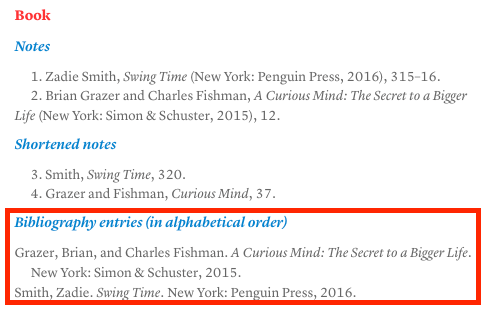
Checklist
Your annotated bibliography should meet the following criteria:
- Fifteen (15) sources in total.
- Adhere to the Chicago Manual of Style’s notes and bibliography style citation, using bibliography-style references (the style with periods rather than commas — an example can be found in the selected area in the image above).
- Sources will serve two broad purposes: 1) scholarly and historical research on your topic, and 2) multimedia assets for your video essay. Compiling these for the annotated bibliography should be considered preliminary, especially in the case of multimedia assets, in that you will need more than what you can find on this first pass. But the goal is to get you thinking early about what you’ll require to complete your video essay.
Research
- A minimum of ten (10) total research sources.
- At least two (2) peer-reviewed scholarly articles or books. I recommend using Google Scholar and adding the library link to the JHU Library (instructions here).
- At least three (3) newspaper articles published in the historical time period of your object, ideally in the lead-up to its release, at the time of its release, or during its major period of use. This category is considered broadly, but the idea is that you’re finding journalistic coverage of your topic from reputable news sources, whatever their platform or political persuasion. Below are some helpful databases to help you find relevant newspaper articles. (Also consider checking out the SPJ Code from the Society of Professional Journalists for a stance on what constitutes ethical journalism.)
- Nexis Uni (for English-language newspapers from around the world)
- Proquest US Newsstream (for US-based newspapers)
- For individual newspaper archives and other databases, see the Johns Hopkins University Libraries Databases list. These databases include publications outside the US that could be relevant if you choose to focus on an object released outside English-speaking markets.
- At least three (3) articles, advertisements, or other resources from computer magazines published during your object’s era. Below are some of the largest collections on Archive.org, which are good places to start:
- English-language magazines
- Non-English-language magazines:
- The remaining articles can be other peer-reviewed research, journalistic sources, or any number of web resources relevant to your topic, including blogs, fan sites, user content, etc.
Multimedia
- Five multimedia assets that might be used in your final project (though you under no obligation to use them, if for instance you later find better ones or your project goes in another direction).
- At least three (3) representative images, perhaps from computer magazines.
- At least one (1) video, perhaps an advertisement, interview, demo, or other historical moving image resource. You might also find YouTube video essays that you can use to help differentiate your project.
- One (1) sound sample. Think about sonic environment of your object. What resources can you add to your essay to add life to the object? Consider sound samples from freesound.org or other online audio archives.
Final Multimedia Project Submission
A screening of the final projects will be held in class on April 23.
Presentation-ready versions of your project must be submitted by Tuesday, April 24, at 11:59 p.m. via Dropbox (link provided on Canvas) so that I can compile the videos for the screening. For those creating a video, this will simply be the video. For those creating a webpage, this will be a 5–7 minute video of your project, featuring either slideshow visuals or your webpage.
Final submissions on Canvas are due by Monday, April 28, at 11:59 p.m. Everyone will submit a Word document. If you have created a website, you will include a link to the site in that document. If you have created a video, you will upload your video file separately via the Dropbox link provided on Canvas. Everyone will have the opportunity to make changes based on feedback from the presentation. If you edit your video, please feel free to delete the old version and simply submit the new one on Dropbox.
In the Word document, everyone should provide the following details:
- Title (up to 100 characters)
- Description (up to 150 words)
- Bibliography (as long as necessary)
The above materials should be proofread and set for publication online, as part of the metadata accompanying your video. Especially important will be proper bibliographic citation. See the Chicago Manual of Style for examples, and feel free to reach out to me if you come across an especially tricky reference.
Video Specs
- Duration: 5–7 minutes
- Format: MP4, H.264 video codec, AAC-LC audio codec
- Aspect ration: 16:9
- Resolution: 1080p
- Frame rate: 30–60 fps
 medialities